influx2.3.0 操作指南
- 版本:influx2.3.0
- 安装方式:docker安装
- 默认数据存储目录:
/var/lib/influxdb2/engine
数据删除、导入导出
1、删除数据
正式环境尽量别做删除操作,开发环境可以使用以下方式删除数据
1
2
3
4
5
| # 按tag和按时间删除数据
influx delete --bucket bucketName \
--start '1970-01-01T00:00:00Z' \
--stop $(date +"%Y-%m-%dT%H:%M:%SZ") \
--predicate '_measurement="测量点名称" AND tagName="参数"'
|
- bucketName:存储桶名称
- measurement:测量点名称
- tagName:测量点定义的tag名称
2、导入/导出Line Protocol格式数据(influx cli)
influx特有的导出方式,导出内容类似于CSV文件格式,可以通过python将其转换为CSV,再导入其它数据库
1
2
3
4
5
6
7
8
| influxd inspect export-lp \
--bucket-id a7b1313e6fa3a90d \
--engine-path /var/lib/influxdb2/engine \
--output-path ./port_history_data.lp \
--start 2020-01-01T00:00:00Z \
--end 2024-01-31T23:59:59Z \
--measurement port_history_data \
--compress #压缩
|
- –bucket-id:存储桶的ID,不能用名称,只能用ID
- –engine-path:influx数据存储路径,默认是/var/lib/influxdb2/engine
- –output-path:导出后输出,及文件名,类型可以是 lp或 tar.gz
- –start | –end:筛选导出数据
- –measurement:测量点名称
- –compress:是否需要压缩,建议加上
导入:
-p:表示文件中time的时间类型,s:表示秒,ns:表示纳秒,默认导出的是纳秒格式
–compression:导入压缩包,仅支持 gzip压缩包
1
2
3
4
| #格式
influx write -b 存储桶名称 --format lp -f 文件路径 -p s
#例子
influx write -b BBB --format lp -f ./xxx_file -p s
|
时区问题
influx数据库的默认时区是 UTC,暂不支持 GMT+8。
踩坑记录,在国内推荐的方式是写入时的数据直接用 GMT时区,查询时传入的时间也用 GMT时区,查询结果就不会出问题。
1
2
3
4
5
6
7
8
9
10
11
12
|
Instant time = LocalDateTime.now().atZone(ZoneId.of("GMT")).toInstant();
influxdbClient.writeMeasurement();
long s = dto.getStartTime().atZone(ZoneId.of("GMT")).toInstant().getEpochSecond();
long e = dto.getEndTime().atZone(ZoneId.of("GMT")).toInstant().getEpochSecond();
influxdbClient.getQueryApi().query();
LocalDateTime formatTime = time.atOffset(ZoneOffset.of("+0")).toLocalDateTime();
|
上述ZoneId.of("GMT")和ZoneOffset.of("+0")是一个意思
下图看到的时间,不需要 +8或-8,去掉T它就是实际时间
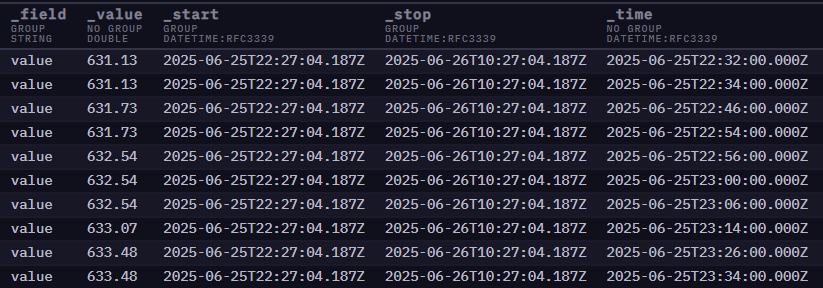
如果已经写入了数据,可以通过以下脚本增加 28800秒,适配成 GMT+8时区(已经踩过的坑)。
时间格式转换脚本示例
1
2
3
4
5
6
7
8
9
10
11
12
13
14
15
16
17
18
19
20
21
22
23
24
25
26
| #! /bin/bash
#获取bucketID
bucketID=`influx bucket find --name=BBB | awk '{print $1}' | sed -n '2,2p'`
echo '获取到bucketId:' $bucketID
#备份数据
echo "开始备份数据"
influxd inspect export-lp --bucket-id ${bucketID} --engine-path /var/lib/influxdb2/engine --output-path ./old_data1 --measurement table1
influxd inspect export-lp --bucket-id ${bucketID} --engine-path /var/lib/influxdb2/engine --output-path ./old_data2 --measurement table2
#增加28800s
echo "正在转换数据"
awk '{$3=($3/1000000000)+28800} 1' old_data1 > old_data1_new
awk '{$3=($3/1000000000)+28800} 1' old_data2 > old_data2_new
#清空旧表
echo "开始清空旧表"
influx delete --bucket acmeict --start '1970-01-01T00:00:00Z' --stop $(date +"%Y-%m-%dT%H:%M:%SZ") --predicate '_measurement="table1"'
influx delete --bucket acmeict --start '1970-01-01T00:00:00Z' --stop $(date +"%Y-%m-%dT%H:%M:%SZ") --predicate '_measurement="table2"'
#重新写入
echo "正在重新写入"
influx write -b acmeict --format lp -f ./old_data1_new -p s
influx write -b acmeict --format lp -f ./old_data2_new -p s
echo "升级完成."
|
Flux脚本数据转换
1
2
3
4
5
6
7
8
9
10
11
12
13
14
15
16
17
18
19
20
21
22
23
24
25
26
27
28
29
30
31
32
33
34
35
36
37
38
39
40
41
42
43
| from(bucket: "bucketName")
|> range(start: time(v: "2025-08-10T00:00:00Z"), stop: time(v: "2025-08-22T23:00:00Z"))
|> filter(fn: (r) => r["projectId"] == "115")
|> filter(fn: (r) => r["_measurement"] == "测量点名称")
|> pivot(
rowKey: ["_time"],
columnKey: ["_field"],
valueColumn: "_value"
)
|> map(fn: (r) => ({
_time: r._time,
_measurement: r._measurement,
tag1: r.tag1,
tag2: r.tag2,
tag3: r.tag3,
field1: r.field1,
field2: r.field2,
field3: float(v: r.field3) * 2.0,
field4: 2.0
}))
|> yield(name: "result")
|> to(
bucket: "新bucket",
org: "acmeict",
fieldFn: (r) => ({
"field1": r.field1,
"field2": r.field2,
"field3": r.field3,
"field4": r.field4
}),
tagColumns: [
"tag1",
"tag2",
"tag3"
]
)
|
缓存失效问题
参考文章
重建 TSI 索引 |InfluxDB OSS v2 文档
参考该文档,执行索引重建命令。